Transport bill format with GST (sample)
Below is the real BilToz transport bill, a GST invoice, filled with sample data. It bills one party for one order that ran on two routes with two LRs, plus a loading and unloading charge. Every name, number and amount is fictional.
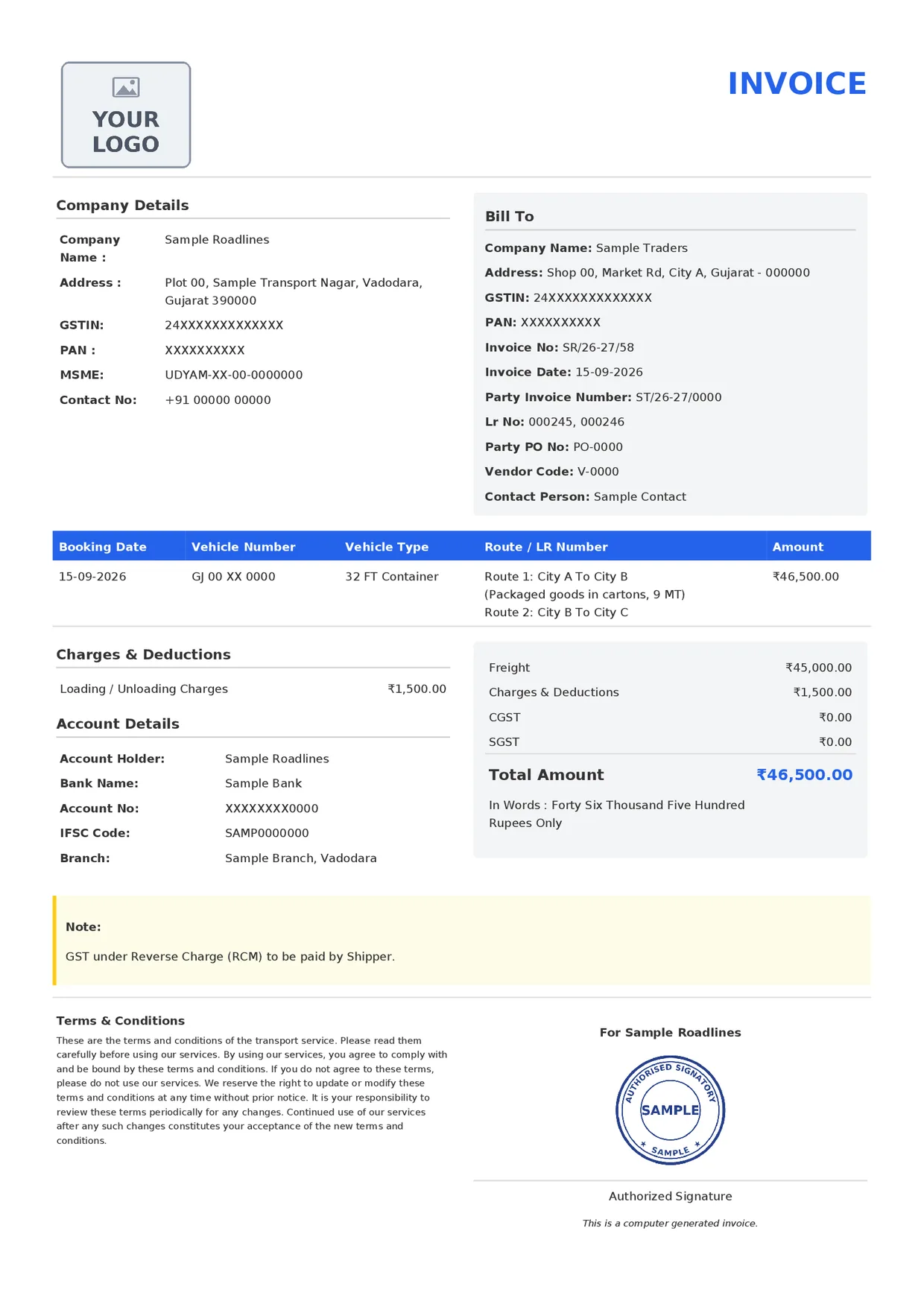
The sample PDF is laid out exactly like a real BilToz invoice; only the data is made up. From top to bottom it has the logo, company details, Bill To box, route row, charges, account details, totals and note, then the terms and conditions beside the For Sample Roadlines line, the stamp and the Authorized Signature line. On a longer bill, the terms and the signature block move together to page 2.
BilToz users do not fill in this format by hand: once a trip is completed, the GST invoice PDF for that order is available in this layout, with their own company details, logo and stamp. Tax lines are covered in the GST transport bill section below.
What each field on the BilToz transport bill means
The table follows the format from top to bottom, section by section, using the labels printed on it. Lines in the Bill To box print only when they have a value.
| Printed field | What it means |
|---|---|
| Logo and INVOICE | The top of the bill: your logo on the left (a YOUR LOGO placeholder in the sample) and the heading INVOICE on the right. The logo comes from your BilToz company profile. |
| Company Details: Company Name and Address | Your transport business's name and address, so the party knows who is billing. Keep them the same as on your LRs and bank account. |
| Company Details: GSTIN and PAN | Your GST identification number and Permanent Account Number, which the party's accounts team records with the bill. |
| Company Details: MSME | Your Udyam (MSME) registration number, if your business has one. |
| Company Details: Contact No | The phone number the party can call with questions about the bill. |
| Bill To: Company Name and Address | The party you are billing for this order's freight. |
| Bill To: GSTIN and PAN | The billed party's GST identification number and PAN, so the bill is booked against the right business. |
| Bill To: Invoice No and Invoice Date | This bill's own serial number (SR/26-27/58 in the sample) and the date it is raised. Keep invoice numbers unique; payment terms usually count from the invoice date. |
| Bill To: Party Invoice Number | The invoice or challan number from the party's own paperwork for the goods, so its accounts team can match your bill to the shipment. |
| Bill To: Lr No | The numbers of the LRs this bill covers (000245 and 000246 in the sample). A BilToz invoice covers one order, so these are that order's LRs. |
| Bill To: Party PO No | The purchase order number the party gave you for this job, if it uses purchase orders. |
| Bill To: Vendor Code | The code under which the party lists you as a supplier, if it has given you one. |
| Bill To: Contact Person | The person at the party who deals with this bill. |
| Booking Date | The date the order was booked. |
| Vehicle Number and Vehicle Type | The registration number of the truck used for the trip, and the kind of truck, such as a 32 ft container. |
| Route / LR Number | One entry per route on the order, written as pickup point To drop point. Any Trip Info entered for a route prints in brackets below it (goods and weight under Route 1 in the sample). The LR numbers themselves print in the Lr No line of the Bill To box. |
| Amount | The row total for the order: freight plus charges (₹46,500.00 in the sample). |
| Charges & Deductions | Each extra charge added to the order, with its note and amount, such as loading, unloading or detention charges (one loading and unloading charge in the sample). Lines print here only when the order has charges. |
| Account Details | Account Holder prints your company name. Bank Name, Account No, IFSC Code and Branch come from the bank details in your company profile. Check the account number and IFSC carefully. |
| Freight | The freight for the order, before charges (₹45,000.00 in the sample). |
| Charges & Deductions (total) | The total of the charges listed under Charges & Deductions on the left (₹1,500.00 in the sample). |
| CGST and SGST | The format has CGST and SGST lines, which always print ₹0.00. They are fixed in the BilToz format: you cannot enter tax amounts, and the ₹0.00 is not advice on how GST applies to your bills. That depends on your and the party's GST registration, so confirm with your CA. |
| Total Amount and In Words | The amount payable, freight plus charges, in figures and then in words (Forty Six Thousand Five Hundred Rupees Only in the sample). The words make any change to the figure easy to spot. |
| Note | The fixed note 'GST under Reverse Charge (RCM) to be paid by Shipper.', printed on every BilToz invoice. It is part of the format, not advice on who pays GST on your trips. Whether reverse charge applies depends on both parties' GST registration, so confirm with your CA. |
| Terms & Conditions | The terms of your transport service, at the bottom left beside the signature block. On a longer bill, the terms and the signature block move together to page 2. |
| For Sample Roadlines and Authorized Signature | 'For' followed by your company name, then your signature or stamp from your company profile above the Authorized Signature line, with the fixed line 'This is a computer generated invoice.' below it. |
General practice, not on the BilToz format: some transport bills also show the date of each LR, packages or weight as separate columns, a separate place of supply (state) line, a SAC code, an IGST line or a payment due date. The BilToz format has no separate fields for these.
GST transport bill format: what to add
The BilToz format has these GST-related parts:
- GSTIN and PAN for your company (Company Details) and for the billed party (Bill To)
- CGST and SGST lines in the totals box, which always print ₹0.00
- A fixed note that reads "GST under Reverse Charge (RCM) to be paid by Shipper."
As general practice, some GST transport bills also show the party's state (place of supply), the service code (SAC) if a CA advises it, the taxable value, or an IGST line. These are not separate fields on the BilToz format.
The ₹0.00 CGST and SGST lines and the reverse-charge note are fixed text in the BilToz format, not advice on who pays GST. Apart from quoting them, this page does not list GST rates or say who should pay GST on freight. That depends on both parties' GST registration, so check your transport GST bill format with your CA, including the tax lines and the reverse-charge note.
How a transport bill differs from an LR
A transporter usually issues two documents for one load. The LR (lorry receipt), also called a bilty, is made when the goods are accepted; the transport bill comes later and asks for payment. For the consignment document, see the lorry receipt (LR) format, or read what bilty means in transport.
| Point | LR or bilty | Transport bill |
|---|---|---|
| Purpose | Records that the goods were accepted for carriage | Asks the paying party for freight and charges |
| When it is made | At booking or loading | After the trip, or periodically for regular parties |
| Where it goes | A copy travels with the goods | To the party's accounts team |
| What it covers | One consignment | One or several LRs for the same party |
| Main details | Consignor, consignee, goods, packages, weight | LR references, freight, charges, tax lines, total, bank details |
On BilToz, one invoice covers one order: its LR numbers print in the Lr No line and its routes in the Route / LR Number column. Separate orders cannot be combined into one invoice.
Freight bill and transport invoice are other names for the transport bill, and the same format works for each.
Simple, local and bill book transport bill formats
Simple transport bill format
If you bill only a few parties, a simple transport bill format needs just:
- Your name and phone, plus the bill number and date
- The party's name and address
- One line per trip: LR number, date, vehicle number, from, to and freight
- Total, amount in words and your signature
Add GSTINs, tax lines and bank details when they apply to your business.
Local transport bill format
Local transporters running tempos or small trucks within a city often bill per trip or per day. Keep the same header and footer, with table columns for date, vehicle number, pickup area, drop area, trips and amount. If you issue an LR or delivery slip for each trip, quote its number.
Transport bill book format
A transport bill book is a printed pad with running serial numbers: the original goes to the party and a carbon copy stays in the book. Its fields are much like the sample above, but paper has limits:
- Totals and amounts in words are worked out by hand, so mistakes slip through.
- A spoiled or lost page leaves a gap in the serial numbers.
- Carbon copies fade, and finding unpaid bills means checking the books page by page.
How to create transport bills online with BilToz
BilToz users do not fill in a bill format by hand. The GST invoice PDF is made from the order in BilToz online LR and bilty software:
- Sign up with your mobile number and an OTP as a Transporter account. Company accounts are for businesses that send goods and cannot create orders, LRs or invoices.
- Complete your company profile with bank details, logo and a signature or stamp. It must be complete before you add parties or create orders and LRs, and the logo and stamp are printed on your PDFs.
- Create the order, choosing parties from the searchable party pickers. Each party you add needs a GSTIN and PAN. To bring in many parties or suppliers at once, send an Excel or CSV file to support for help with a bulk import.
- Make the LRs for the order, entering the consignor and consignee on each LR. Once the consignor, consignee and material are filled in, you can download or print the LR PDF with consignor, consignee and driver copies.
- Get the GST invoice PDF once the trip is completed. It covers that one order, with its LR numbers in the Lr No line and its routes in the Route / LR Number column; separate orders cannot be combined into one invoice.
- Send it to the party: download the PDF, then use the WhatsApp button. It opens a share panel with a ready-made message about the invoice. The party's number is not filled in: type it under Send to, or leave it blank and pick the chat in WhatsApp, then attach the PDF yourself.
After the trip is completed, you can also upload the POD to the order (one file per order). KYC needs Aadhaar OTP and PAN; GSTIN and GST certificate are optional for Transporter accounts. Complete it within 30 days of sign-up. Every feature is free during the launch period: Rs 0, with no credit card, no trials and no usage limits; paid tiers may come later, with advance notice. For more on billing parties, see transport billing software, or talk to support.
Frequently asked questions
What is the difference between a transport bill and an LR or bilty?
An LR (lorry receipt), also called a bilty, is issued when the transporter accepts the goods, and a copy travels with them. A transport bill, also called a freight bill or transport invoice, is sent to the paying party later to collect freight and other charges, and it can cover several LRs.
What details should a GST transport bill include?
Usually: the transporter's name, address and GSTIN; bill number and date; the party's name, address, GSTIN and state; LR details for each consignment; freight and other charges; taxable value with tax lines or a reverse-charge note; grand total in figures and words; bank details; and a signature. How tax is shown depends on both parties' GST registration, so confirm with your CA.
Can I make a transport bill format in Excel or Word?
Yes. You can set up the fields explained on this page in your own spreadsheet or document, using the sample PDF as a reference. The sample's ₹0.00 CGST and SGST lines and its reverse-charge note are fixed text in the BilToz format, not advice, so ask your CA which tax lines your own bill needs. BilToz does not provide Excel or Word templates. BilToz users do not need one: once a trip is completed, the GST invoice PDF for that order comes in the format shown on this page.
Is there free software to make transport bills?
BilToz is free during its launch period: every feature costs Rs 0, with no credit card, no trials and no usage limits. Paid tiers may come later, with advance notice. Once a trip is completed, you get its GST invoice as a PDF in the format shown on this page.