Lorry receipt format sample
The sample below is the real BilToz lorry receipt format, the same layout BilToz creates when a user makes an LR, filled with fictional sample data. It works equally as a transport bilty format or truck bilty format. Open the image or the sample PDF to see all three copies.
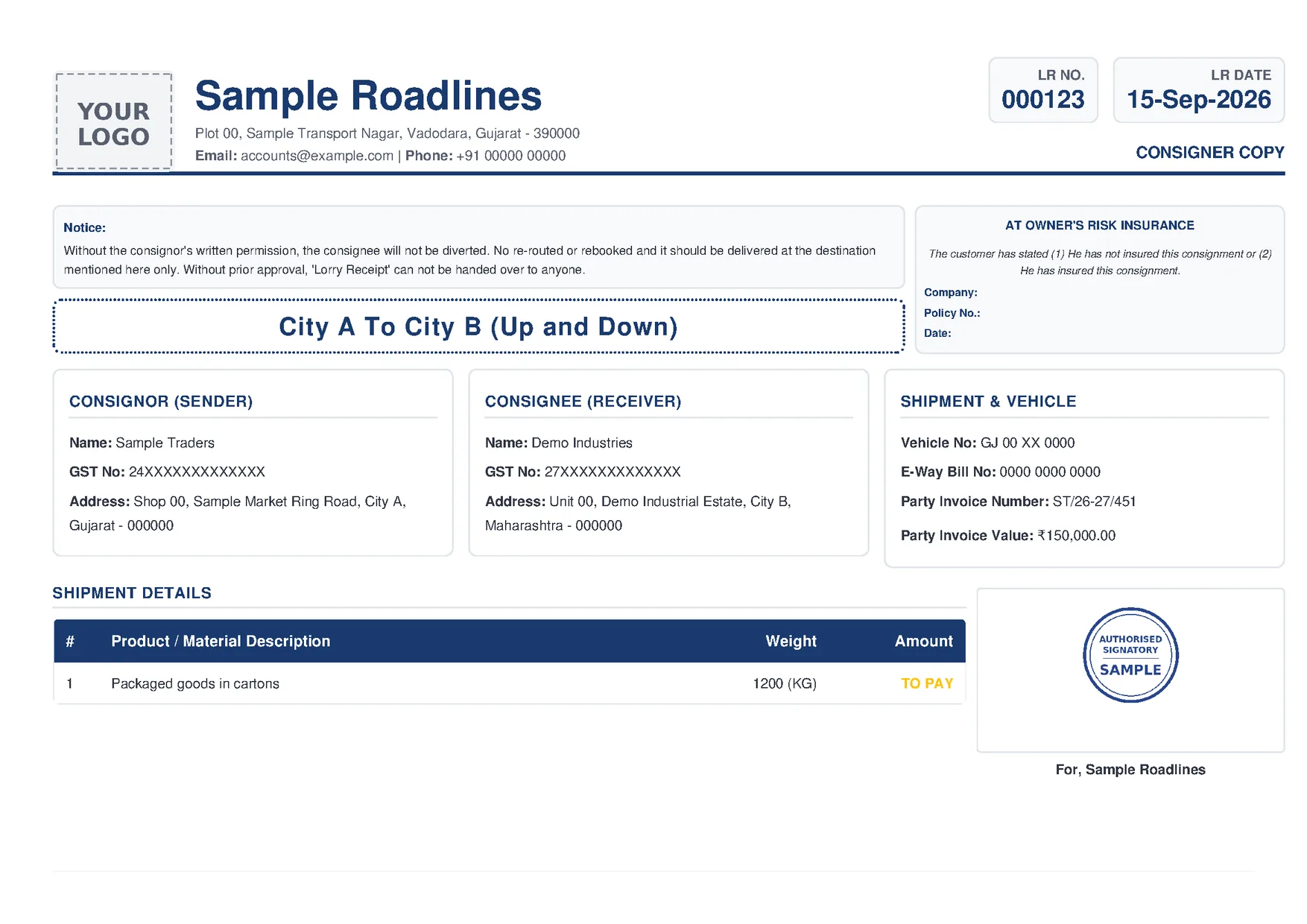
What each field in the LR format means
Each field answers a question someone will ask later: at delivery, at billing, or when a shortage is reported. The table follows the BilToz LR from top to bottom, using the labels as they are printed.
| Field | What it means |
|---|---|
| Logo, company name and address | The transporter issuing the LR. BilToz prints your company logo, name and address at the top of every copy. |
| Email: and Phone: | The transporter's email address and phone number, so the consignor, consignee or driver can reach your office. |
| LR NO. | The serial number of the lorry receipt, used to identify the consignment later. BilToz gives each LR the next number in your LR number series, and the GST invoice for the order lists its LRs. |
| LR DATE | The booking date of the consignment, printed as day, month and year (for example 15-Sep-2026). |
| CONSIGNER COPY / CONSIGNEE COPY / DRIVER COPY | Which copy the page is. The PDF has one page for each of the three copies, each in its own colour, with the same details on all three. |
| Notice: | A standard notice printed on every BilToz LR: without the consignor's written permission the consignment is not diverted, re-routed or rebooked, it is delivered only at the destination shown, and the LR is not handed over to anyone without prior approval. |
| [From] To [To] ([Trip Info]) | The route: where the goods are picked up and where they are to be delivered, printed in large letters. Any trip info, such as 'Up and Down', follows in brackets. |
| AT OWNER'S RISK INSURANCE | A standard insurance box, the same on every BilToz LR. It prints the heading AT OWNER'S RISK INSURANCE and the line 'The customer has stated (1) He has not insured this consignment or (2) He has insured this consignment', with neither option marked. It is fixed text: BilToz does not record any risk or insurance terms agreed with the party. For who bears the loss if goods are lost or damaged, check your contract and take legal advice. |
| Company:, Policy No.:, Date: | The insurance company, policy number and policy date when the goods are insured. BilToz prints these three lines blank, as in the sample, so write them in on the printed copy if they apply. |
| CONSIGNOR (SENDER): Name:, GST No:, Address: | The party sending the goods: name, GST number (GSTIN) and address with city, state and PIN code. These details are entered on each LR. |
| CONSIGNEE (RECEIVER): Name:, GST No:, Address: | The party receiving the goods at the destination, with the same three details. GST No shows the receiver's GSTIN where it is registered under GST. |
| Vehicle No: | The registration number of the truck carrying the goods. |
| E-Way Bill No: | The e-way bill number, if the consignment has one. The field is optional: BilToz prints the number you enter but does not generate or file e-way bills. |
| Party Invoice Number: | The number of the goods invoice that goes with the consignment, usually the consignor's, so the LR can be matched to it. |
| Party Invoice Value: | The value of the goods on that invoice, printed in rupees. On a BilToz LR it is the material amount entered on the LR, not the freight. The declared value is often referred to for insurance and for claims if goods are lost or damaged. |
| SHIPMENT DETAILS: # and Product / Material Description | What the goods are, with a row number. A BilToz LR prints one row, from the material details entered on the LR. |
| Weight | The weight of the goods in kilograms, printed with (KG) after the number. |
| Amount | No rupee amount prints here. The column shows TO PAY or BILLED, as set on the order. |
| Signature or stamp, and For, [company name] | Your signature or stamp from the company profile, printed above 'For, [your company name]', showing the LR is issued by your company. |
General practice, not on the BilToz LR: some transporters' LR or bilty formats also carry the driver's name and mobile number, the transporter's GSTIN, bank details, the number of packages, a charged weight, the freight amount and other charges, a line for who pays GST on freight, remarks, terms and conditions, and the receiver's signature and stamp at delivery. The BilToz LR format does not have these fields. Who pays GST on freight depends on the parties' GST registration, so confirm with your CA.
LR copies: consignor, consignee, driver and office
A lorry receipt is usually made in several copies, and an LR copy format is the same document with the copy name printed at the top. A common set, as general industry practice:
- Consignor copy: kept by the sender as a record of handing over the goods.
- Consignee copy: goes with the goods or to the receiver, who uses it to take delivery.
- Driver or lorry copy: stays in the truck with the consignment during the trip.
- Office copy: kept by the transporter for records and billing. In a bilty book it is often the leaf left bound in the book.
The number of copies varies by transporter. The BilToz LR is one PDF with three pages, CONSIGNER COPY, CONSIGNEE COPY and DRIVER COPY, each in its own colour with the same details, so there are no carbon leaves to fill in. There is no separate office copy page, so print an extra copy or keep the downloaded PDF for your records. See all three pages in the sample LR PDF.
Bilty format vs LR format: the same document
A bilty is the same document as a lorry receipt, so a transport bilty format or transport receipt format uses much the same fields; only the heading and a few columns change from one transporter to another. For what bilty, LR and GR mean, see bilty and LR meaning.
Bilty format with GST: the BilToz LR prints the GST No of the consignor and the consignee, but no GST amount. Some transporters' formats add a line for who pays GST on freight; that depends on the parties' GST registration, so confirm with your CA.
The LR is not the transport bill: the LR travels with the goods, while the freight bill is a separate invoice raised to collect payment. In BilToz, the GST invoice PDF is available once the trip is completed and lists the order's LRs. See the transport bill format for that document.
Paper bilty book vs creating LRs online
A bilty book is a pre-printed, serially numbered book of LR forms, usually with carbon leaves for each copy. It needs only a pen at the booking point; the table shows where the extra work comes in.
| Task | Paper bilty book | Online with BilToz |
|---|---|---|
| LR numbering | Pre-printed serial number on each leaf | Next number from your LR number series, printed on every copy |
| Party details | Written by hand on every LR | Party picked from a searchable list on the order; consignor and consignee details entered on each LR and printed on all three copies |
| Logo and stamp | Rubber stamp on each leaf | Logo and signature or stamp from your company profile printed on every copy |
| E-way bill | Number copied onto the LR by hand | Optional E-Way Bill No field printed on the LR (BilToz does not generate or file e-way bills) |
| Sharing copies | Carbon copies or photos | One PDF with consigner, consignee and driver copies to download or print; the WhatsApp button prepares a text message, and you add the party's number (or pick the chat) and attach the PDF yourself |
| Proof of delivery | Signed copy sent back to the office | One POD file uploaded to the order once the trip is completed |
A bilty book still works for a handful of LRs. As the number of LRs grows, creating them online saves writing the same details on every copy, and there are no carbon leaves to handle.
How to create an LR online with BilToz
- Sign up with your mobile number and an OTP as a Transporter account. Company accounts are for businesses that send goods and cannot create orders, LRs or invoices.
- Complete your company profile with bank details, logo and a signature or stamp. BilToz needs it before you add parties or create orders and LRs, and prints the logo and stamp on every LR copy.
- Add parties and suppliers one by one (each party needs a GSTIN and PAN, and each supplier a PAN), or send an Excel or CSV file to support for help with a bulk import (there is no self-serve import screen).
- Create the order: pick the party from the searchable list and add the route.
- Add the LR: fill in the consignor, consignee and material details, which the LR PDF needs.
- If the consignment has an e-way bill, enter its number in the E-Way Bill No field. BilToz does not generate or file e-way bills.
- Download or print the LR PDF with its consigner, consignee and driver copies. The WhatsApp button opens a share panel with a ready-made message about the LR. The party's number is not filled in: type it under Send to, or leave it blank and pick the chat in WhatsApp, then attach the downloaded PDF yourself.
- Complete KYC within 30 days of sign-up: Aadhaar OTP and PAN. GSTIN and GST certificate are optional for Transporter accounts.
Once the trip is completed, upload the POD to the order (one file per order); the GST invoice PDF for the order also becomes available then. For GST invoices, see transport billing software.
Every feature is free during the launch period (Rs 0), with no credit card, no trials and no usage limits; paid tiers may come later with advance notice. Start with BilToz online LR and bilty software, or email support@biltoz.com for help importing your party list first.
Frequently asked questions
Does a bilty format have different fields from an LR format?
Usually not. The core fields are the same, and individual transporters add their own columns or change the heading. For what the words bilty and LR mean, see the bilty and LR meaning guide.
What details does a lorry receipt usually include?
There is no single layout every transporter follows. In general practice an LR shows the LR number and date, route, consignor and consignee with GSTINs where registered, vehicle number, goods details, invoice and e-way bill references where applicable, freight terms and signatures. The BilToz LR format covers these, with the freight terms shown as TO PAY or BILLED and your own signature or stamp. Which details your LRs must carry for GST depends on the parties' GST registration, so confirm with your CA.
Can I download this lorry receipt format as a PDF?
Yes. The Download sample PDF button opens the real BilToz LR format filled with fictional sample data: three A4 landscape pages with the consigner, consignee and driver copies. It is a generic format for illustration, and the sample is a PDF only, not a Word or Excel file. If you use BilToz you do not need to copy it: BilToz creates your LRs in this format automatically, with your own details, logo and stamp.
Is there a free way to create LRs online?
Yes. BilToz is free during its launch period: every feature costs Rs 0 with no credit card, no trials and no usage limits. Paid tiers may come later with advance notice.